Quick answer: To convert a Roblox user ID to a username, open roblox.com/users/USERID/profile or paste the ID into a username lookup, which shows the current username and profile. To go the other way, open the user's profile and read the number in its URL: roblox.com/users/123456789/profile means the user ID is 123456789. The user ID never changes; the username can.
Roblox accounts have two identifiers, and knowing how to move between them saves a lot of confusion, especially when someone renames. This short guide covers both directions and, more importantly, when to rely on the user ID instead of the name.
What is a Roblox user ID?
A user ID is the permanent number Roblox assigns to an account the moment it is created. It is the account's true, unchangeable identity. The username (the @handle) and the display name can both be changed, but the user ID is locked for life. That is why developers, moderators and traders lean on the ID: it is the one thing about an account that cannot move.
Convert a user ID to a username
You have a number and you want to know who it belongs to:
- Direct URL. Go to
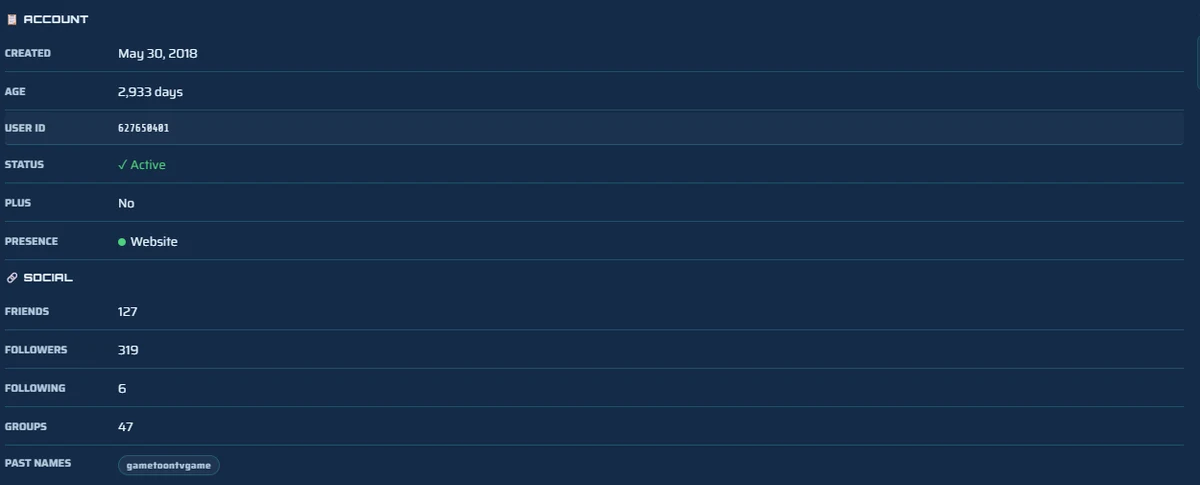
roblox.com/users/USERID/profile(swap in the number). Roblox loads that account and shows its current username. - Username lookup. Paste the ID into a lookup tool to get the current name plus account age, past usernames and the rest of the public profile in one view.
Either way you get the current name, even if the account was renamed after you saved the ID, which is the whole point of starting from the number.
Convert a username to a user ID
You have a name and you want its permanent number:
- Read the profile URL. Open the user's profile and look at the address bar:
roblox.com/users/123456789/profile. The number is the user ID. - Use a lookup. A username lookup shows the user ID right next to the account details, so you do not have to dig through the URL.
If you only have a name and cannot find the account at all, the issue is usually a rename or a typo, our guide on finding a player by username covers those cases.
Why use the user ID at all?
Because usernames are not permanent and can even be reused. Save someone by username and, if they rename, the name might point to nobody or, worse, to a completely different person who grabbed it. The user ID never has that problem:
- Tracking renamers. Traders and scammers often change usernames to shake off a reputation. The ID follows them anyway.
- Stable records. A watchlist or note keyed to the ID always points at the same account.
- Cross-checking. If two people claim the same old name, the ID tells you which is the original account.
For developers: the API route
If you are scripting this, Roblox exposes official endpoints: post a list of usernames to the users API to get their IDs, or request a user ID to read its profile and current username. This is the proper, rate-limited way to convert in bulk rather than scraping profile pages. For one-off lookups, the profile URL or a lookup tool is faster.
On mobile and console
In the Roblox app the user ID is not shown on the profile and the URL is hidden, which makes either conversion awkward. On Xbox and PlayStation it is harder still. Since both identifiers are public, the simplest route on any device is to open this page in your phone or console browser and paste the ID or username into the username lookup.
FAQ
What is a Roblox user ID?
The permanent number Roblox assigns every account at creation. Unlike the username, it never changes, so it is the most reliable way to identify one account. It appears in the profile URL: roblox.com/users/123456789/profile.
How do I convert a Roblox user ID to a username?
Open roblox.com/users/USERID/profile to see the current username, or paste the ID into a username lookup for the name plus the rest of the public profile. The current name shows even after a rename.
How do I find a Roblox user's ID from their username?
Open their profile and read the number in the URL: roblox.com/users/123456789/profile means the ID is 123456789. A username lookup also displays the user ID next to the account details.
Does a Roblox user ID ever change?
No. The user ID is fixed for the life of the account. The username and display name can change, but the user ID stays the same, which is why it is the dependable identifier for tracking an account.
Why use the user ID instead of the username?
Because usernames change and can be reused. Save someone by username and a rename may point the name at nobody or someone else. The user ID guarantees you are always looking at the same account.
Related guides
How to Find Any Roblox Player by Username
Search by username or display name and pull up the right account, plus what to do when a search fails.
Name historyHow to See a Roblox Account's Past Usernames
Find an account's old names, the data that makes the permanent user ID so useful.
Profile viewerRoblox Profile Viewer: See Any Public Profile
Everything public on an account in one view once you have found it by ID or name.