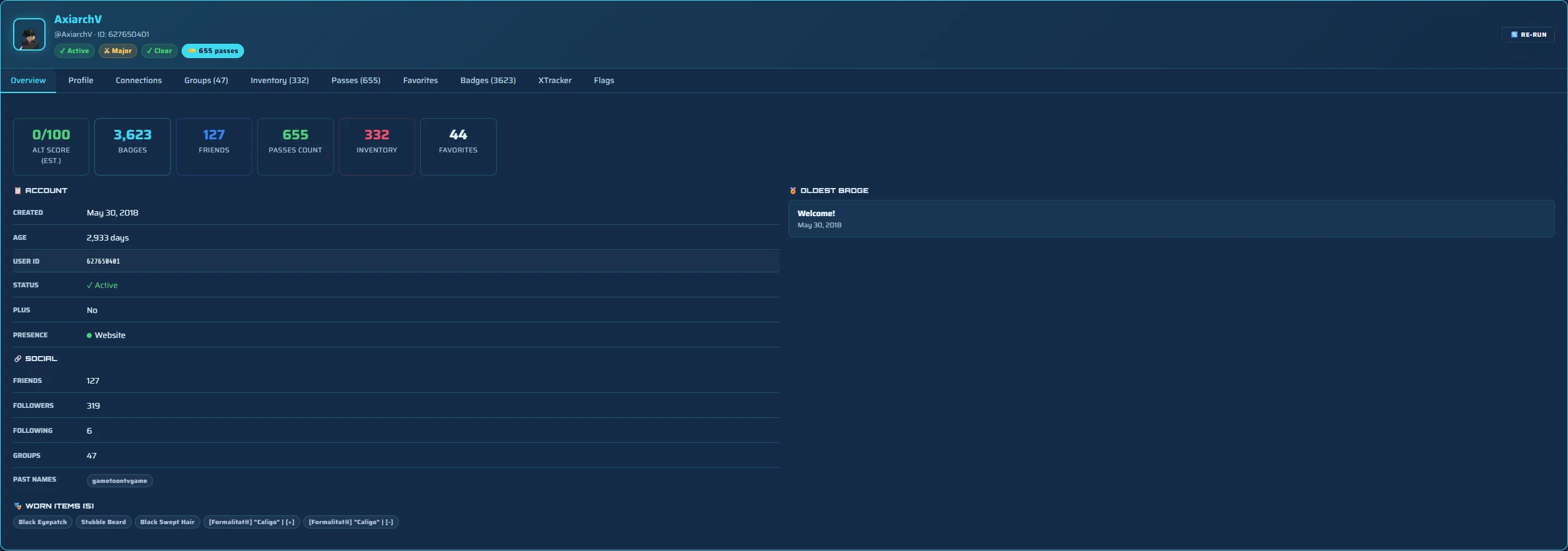
Quick answer: A Roblox profile viewer shows everything an account makes public in one place: username and display name, user ID, account age and creation date, description, badges, groups, friends and follower counts, favorite games, and current online status. A good viewer also surfaces what the profile page hides, like past usernames and the badge timeline. Paste a username into the free profile viewer to see it all, no login needed.
Roblox's own profile page shows a slice of what an account actually reveals, and it scatters the rest across tabs or hides it entirely. A profile viewer pulls the whole public picture into one readable view. This guide covers exactly what you can see, what stays private, and why a viewer beats clicking through the profile by hand.
What a Roblox profile viewer shows
Every Roblox account leaks a surprising amount of public information. A complete profile viewer reads all of it:
- Identity: the @username, the display name, and the permanent user ID.
- Account age: the exact creation date and how old the account is in days and years.
- Description: the bio text the owner wrote.
- Badges: the badge count and, in a good viewer, the acquisition timeline.
- Groups: the groups the account belongs to and the rank it holds in each.
- Social: friends, followers and following counts.
- Favorites and games: favorite experiences and creations.
- Presence: whether the account is online, in a game, or offline right now, when privacy allows.
What is public vs private on a Roblox profile
A viewer can only show what Roblox makes public, and that line moves depending on the owner's privacy settings. Here is the honest split:
- Always public: username, display name, user ID, account creation date, and past usernames.
- Public by default, can be hidden: inventory, friends, and current online status. Many players never change these, so they are usually visible, but a locked-down account can hide them.
- Never public: private messages, email, password, payment details, and the exact historical "last online" time, which Roblox removed in 2024.
Any site that claims to show private messages, a real last-online timestamp, or to "unlock" a private profile is lying, and usually trying to steal your account. A real viewer reads public data and is upfront about where the line is.
See the parts Roblox buries
The most useful job of a profile viewer is surfacing public data that the Roblox profile page does not show cleanly:
- Past usernames. Previous names are public but absent from the profile. A viewer pulls the full name history, which flags a recently renamed account.
- Badge timeline. The profile shows badges as a flat list. A viewer orders them by date so you can see a slow, genuine trail versus a same-day badge spike.
- Alt signals together. Account age, badges, name history and social footprint read as one picture give you an estimated alt score, instead of five separate tabs you have to weigh yourself.

Profile viewer vs the Roblox profile page
You can always open the Roblox profile directly, so why use a viewer? Speed and completeness. The native page makes you click into badges, then groups, then guess at the account age from the join date, and it never shows past usernames or a badge timeline at all. A viewer answers the question you actually have, "who is this account and can I trust it?", in one screen instead of ten clicks. If you just need to locate the account first, our guide on finding a player by username covers the search side.
On mobile and console
The Roblox mobile app shows an even thinner profile than desktop, with badges and groups behind taps and no name history at all. On Xbox and PlayStation it is more limited again. Since every field a viewer reads is public, the simplest option on any device is to open this page in your phone or console browser and paste the username into the free profile viewer, which lays out the same full picture everywhere.
View a profile safely
A legitimate profile viewer reads public data only. It never needs your password, never asks you to log into Roblox, and never touches the account you are viewing. Paste a username into the homepage viewer and you get the overview instantly; a free sign-up opens the full report with the complete badge timeline, real past usernames, inventory and groups. If a "viewer" asks for your login or promises private data, close the tab.
FAQ
What does a Roblox profile viewer show?
Everything an account makes public: username and display name, user ID, account age and creation date, description, badges, groups, friends and follower counts, favorite games, and current online status. A good viewer also surfaces past usernames and the badge timeline that the profile buries.
Can a Roblox profile viewer see a private profile?
No. A viewer only reads public data. Anything the owner has hidden stays private. Any site claiming to unlock a private profile, show private messages or reveal an exact last-online time is a scam.
Can I see someone's Roblox badges and groups?
Yes, both are public. A viewer lists an account's groups and badges, and a good one shows the badge acquisition timeline so you can tell a genuine trail from a same-day spike.
Can I see a Roblox profile's past usernames?
Yes. Previous usernames are public, but Roblox does not show them on the profile. A viewer or username lookup pulls the full name history, which helps spot a recently renamed account.
Do I need to log in to view a Roblox profile?
No. Public profiles view without any account, and a free viewer never asks for your password or a Roblox login. You only sign up for unlimited checks and the full report.
Related guides
How to Find Any Roblox Player by Username
Search by username or display name, convert a user ID, and pull up the right account fast.
BadgesHow to Check Roblox Badges
Read an account's badge count and timeline, and learn what a badge spike really means.
Alt detectionHow to Tell if a Roblox Account Is an Alt
Weigh account age, badges, name history and activity to estimate the odds an account is an alt.