Quick answer: To find a Roblox player by username, type the exact username into Roblox's search bar and open the Users tab, or go straight to roblox.com/users/profile?username=THENAME. For a readable summary instead of the raw profile, paste the username into a free Roblox username lookup, which returns the account, its user ID, account age and public details in one place.
Finding a specific player sounds like it should take one click, and usually it does. But Roblox has two different names per account, usernames change, and accounts get banned or hidden, so the "I searched and got nothing" moment is common. This guide covers the fast way to find anyone by username, what to do when the obvious search fails, and how to turn what you find into a full read on the account.
Find a player by their exact username
The username (the @handle) is the reliable way to find someone, because it is unique: only one account can ever hold a given username at a time. Three routes get you there:
- Roblox search bar. Type the username, press enter, and switch to the Users tab. Roblox defaults to showing games and groups first, so the people results are easy to miss.
- Direct URL. Visit
roblox.com/users/profile?username=THENAMEand Roblox sends you to that exact account. This skips the search results entirely. - Username lookup tool. Paste the name into a username lookup and get the profile plus the user ID, join date and a public summary in one view, without digging through tabs.
Username vs display name (this is where searches go wrong)
Since 2021, every Roblox account has two names: the permanent @username and a changeable display name shown in big letters on the profile and in games. They are not the same thing, and the difference is the number one reason a search returns the wrong person:
- Usernames are unique. One account, one handle. Searching the username gets you the right person every time.
- Display names are not unique. Hundreds of accounts can share the display name you remember, so a display-name search can return a crowd or the wrong account entirely.
If you only know the big name you saw in a game, that is probably the display name. Try it, but expect to scan several results, and confirm you have the right person before trusting anything you find. The handle starting with @ is what actually pins the account down.
Find a player by user ID (and convert either way)
Every account also has a permanent user ID, a number that never changes even when the username does. It is the most durable way to track one specific person. You can read it straight from the profile URL:
roblox.com/users/123456789/profilemeans the user ID is 123456789.- To go from a user ID back to the current username, open that URL or paste the ID into a lookup. The current name is shown even if the account has been renamed since you last saw it. See the full guide on converting a Roblox user ID to a username.
If you are tracking someone who changes their username often, save the user ID, not the name. The name can move, but the ID is locked to the account for life.
See the full profile once you have found them
Finding the account is step one. The reason most people are searching is step two: they want to know who this account actually is. Roblox's own profile shows the basics, but the signals that matter for trust, account age, past usernames, badge history and whether the profile looks like an alt, are scattered across tabs or not surfaced at all.
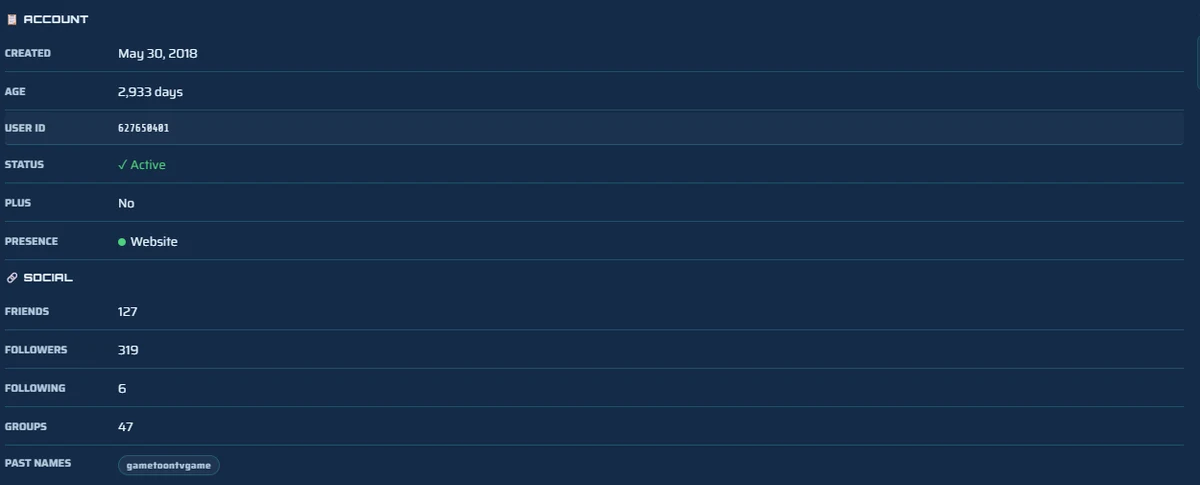
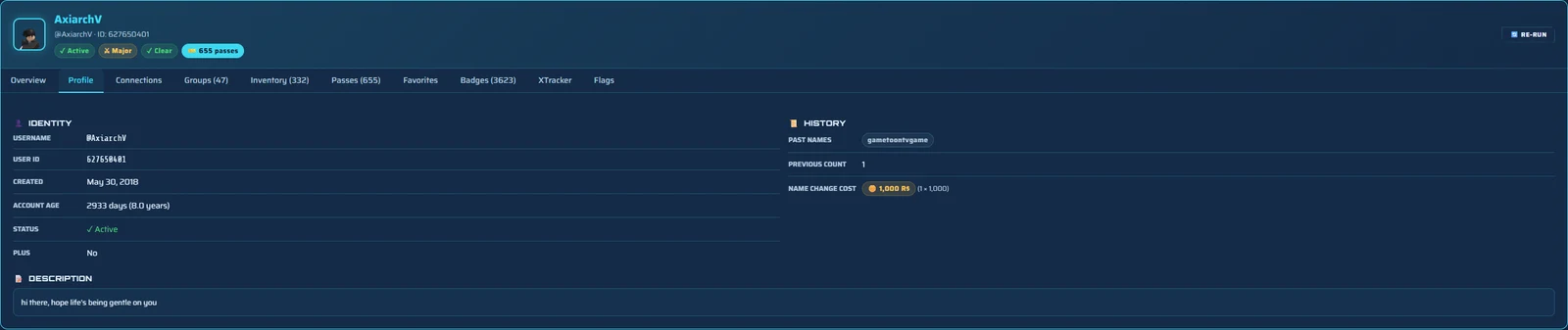
That is what a free background check pulls together. Enter the username on the homepage checker and you get the account age and creation date, the count of past usernames, an estimated alt score and live online status in one read, with the full report a free sign-up away. It is the difference between confirming an account exists and understanding it.
On mobile and console
On the Roblox mobile app, tap the search icon, type the username, and open the People or Users results, the layout buries them under games just like desktop. On Xbox and PlayStation, search is more limited and the cleanest route is the direct profile URL or a lookup in the console browser. Because everything here is public, the simplest cross-device option is to open this page in any phone or console browser and paste the username into the username lookup, which works the same everywhere.
When you cannot find a player
If a search comes up empty for someone you know exists, it is almost always one of these:
- They changed their username. The old name now points nowhere, or worse, to a different person who grabbed it. Search by user ID instead, since that never moves. Our guide on past usernames covers how to read an account's name history.
- The account is banned or terminated. Banned accounts drop out of search and can show a limited or unavailable profile. The user ID URL may still load a stub.
- A typo or look-alike character. A capital I versus a lowercase l, or a 0 versus an O, sends you to the wrong account or none. Copy and paste the exact name when you can.
- Privacy settings. You can still find the account, but hidden details like friends or online status will not show. That is the owner's choice, not a search failure.
Find a player fast
Doing all of this by hand, search, switch tabs, open the profile, dig for the join date, works for one person but gets slow fast. Since every detail comes from public Roblox data, it can be pulled in one step. Paste a username into the lookup or the free checker and you get the right account, its user ID and a readable summary in seconds, then decide whether you need the full report.
FAQ
How do I search for a Roblox player by username?
Type the exact username into Roblox's search bar and open the Users tab, or go straight to roblox.com/users/profile?username=THENAME. For a readable summary, paste the username into a free username lookup, which returns the account, its user ID, age and public details in one view.
Can I find a Roblox player by their display name?
Sometimes. Display names are not unique and are not how Roblox indexes accounts, so a display-name search can return several people or the wrong one. The reliable identifier is the @username or the numeric user ID, which only ever point to one account.
How do I find a Roblox player's user ID?
Open the profile and read the number in the URL: roblox.com/users/123456789/profile means the user ID is 123456789. A username lookup shows the user ID directly, and you can convert a user ID back to the current username the same way.
Why can't I find a Roblox player I know exists?
Usually a changed username (the old name now points nowhere or to someone else), a banned or terminated account that no longer appears in search, or a typo or look-alike character. Searching by user ID avoids the username problem entirely.
Can I see a private Roblox profile?
You can always find the account and its public basics like username, user ID and join date. Details the owner has hidden, such as friends, inventory or online status, stay private. No legitimate tool can reveal private data, and any site claiming otherwise is a scam.
Related guides
How to See a Roblox Account's Past Usernames
Find an account's old usernames and read why a long name history or a fresh rename is a signal worth noticing.
Alt detectionHow to Tell if a Roblox Account Is an Alt
Read account age, badges, name history and activity to estimate the odds an account is a throwaway.
Account ageHow to Check How Old a Roblox Account Is
Where the Join Date lives, how to turn it into an age, and what counts as a suspiciously young account.