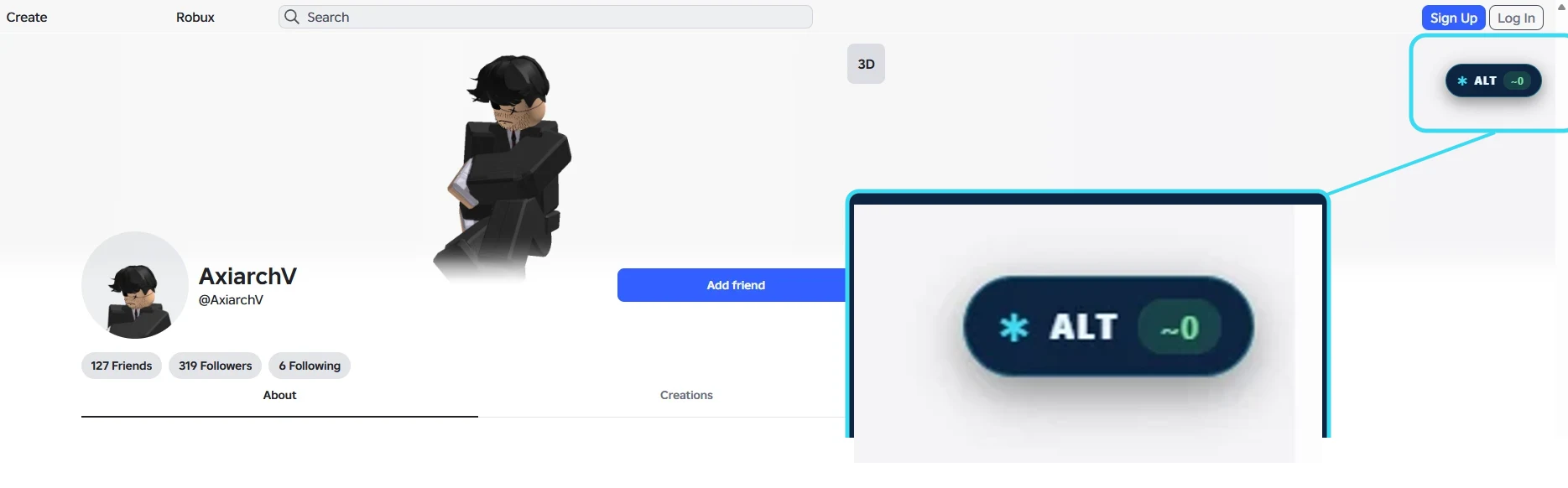
BGC Panel started as a site you paste a username into. The Chrome extension brings the same checks to where you actually run into Roblox accounts: the profile page itself. Open someone's Roblox profile and the extension surfaces a quick read on the account right there, so you do not have to copy the username into another tab to find out who you are dealing with.
Add it to your browser
Free to install. Runs the core checks on any public Roblox profile, from public data only.
What the extension checks
The extension reads the same public profile signals the website does and lays them out at a glance:
- Estimated alt score: an at-a-glance read of how alt-like the profile looks, built from public signals, the same score the web alt checker shows. It is an estimate, not a verdict.
- Account age and creation date: how old the account is, the classic first tell when something feels off.
- Past usernames: the names the account has gone by before its current one.
- Badge history: the badge timeline that shows whether an account actually plays or just exists as a shell.
- Full background check: one click opens the complete report on bgcpanel.site when you want the deeper dive.
How it works
- Install it from the Chrome Web Store with the Add to Chrome button above.
- Open any public Roblox profile in your browser, the same way you normally would.
- The extension surfaces the check on the profile. No copying the username, no second tab.
It works in Chrome and other Chromium browsers like Microsoft Edge and Brave, since they all install from the same Chrome Web Store.
Is the extension safe?
Same rule as the website: the extension only reads public profile data. It never asks for your Roblox password, never wants your .ROBLOSECURITY cookie, and never promises Robux. A tool that asks for any of those is exactly the thing you are trying to avoid. It reads the same public pages you can already see yourself, and it is not affiliated with Roblox in any way.
What permissions does it ask for?
The extension keeps its footprint small on purpose. It runs on Roblox profile pages, where it reads the public username on the page and fetches the same public signals you could look up by hand. It does not track your browsing, does not run on other sites, and does not touch your Roblox session. If a future update ever needed a new permission, Chrome would ask you before it takes effect, that is how the Web Store works for every extension.
That narrow scope is deliberate. Most "Roblox checker" extensions that go bad do it the same way: they ask for broad host access, then start reading cookies. BGC Panel's checks run against its own API with nothing but a username, so there is simply nothing sensitive for it to hold.
Three habits that make it click
- Check before you reply. When a stranger messages you about a trade, open their profile first. The alt score and account age tell you in two seconds whether the conversation is worth having.
- Use it in-game lobbies too. Anyone you can click through to a profile, you can check: group join requests, new friends, that suspiciously good player in your server.
- Escalate to the full report when it matters. For trades with real value, one click opens the complete background check with past usernames, badge timeline and cheating flags on bgcpanel.site.
Extension or the web app?
The extension and the website answer slightly different needs, and they share the same account. The extension is for the spur-of-the-moment check: someone messages you, you open their profile, you get a read in place. The website is for the full report and the player tracker, where you want everything laid out, saved, and watched over time. Most people end up using both: the extension to flag something, the site to dig in. If you are weighing tools, the free Roblox account checkers comparison puts BGC Panel next to the alternatives.
FAQ
Is the BGC Panel Chrome extension free?
Yes. It is free to install and run the core profile checks. Deeper features like the AI alt-probability score and higher tracker limits are part of BGC Panel Plus, the same as on the website.
Does the extension need my Roblox login?
No. It reads public profile data only. It never asks for your Roblox password or your .ROBLOSECURITY cookie, and you do not log into Roblox through it.
Which browsers does the extension support?
Chrome, plus other Chromium browsers that install from the Chrome Web Store, such as Microsoft Edge and Brave.
Can the extension prove an account is an alt?
No. It reads public signals like account age, badges and name history and turns them into an estimate. That is a strong starting point, not proof, since real new players exist and every signal can be faked.
Related guides
Want to know what the numbers mean? These walk through the actual signals the checker reads.
How to Tell if a Roblox Account Is an Alt
The public signals behind every alt score: account age, badge walks, name history and activity patterns.
Account ageHow to Check How Old a Roblox Account Is
Where the Join Date lives, how to turn it into an age, and what counts as a suspiciously young account.
Tool comparisonBest Free Roblox Account Checkers (2026)
An honest side-by-side of the free Roblox account checkers, and where each one falls short.
BGC Panel is not affiliated with, endorsed by, or sponsored by Roblox Corporation. "Chrome" is a trademark of Google LLC.