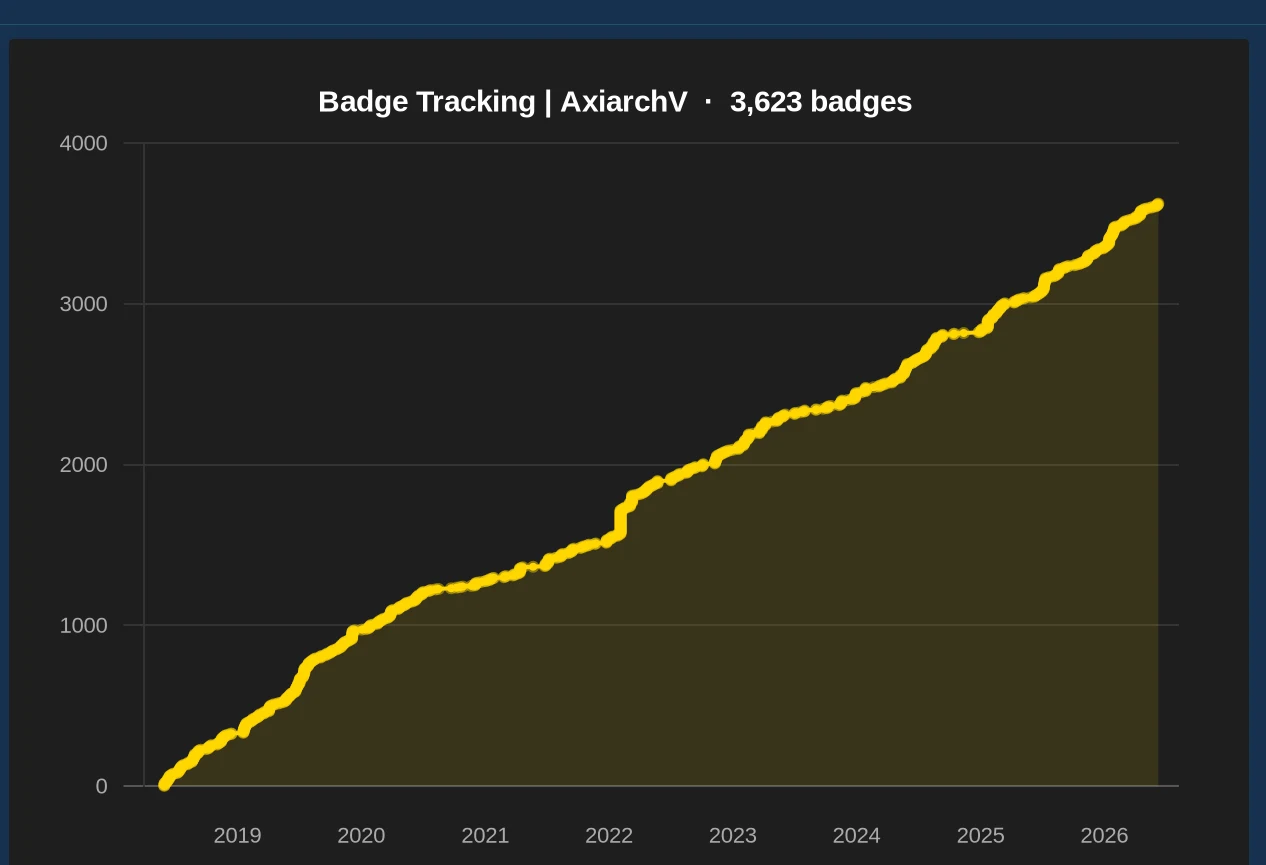
Quick answer: Roblox has no public, account-wide playtime counter, so you cannot pull a single total of hours played, and you cannot see another player's playtime at all. You can see your own time inside individual games that track it. To gauge how active any account is, read its public activity signals instead: the badge timeline, favorite games, account age and current presence.
"How do I check my Roblox playtime?" is a common question with a frustrating answer: the single number most people are picturing does not exist. Here is exactly what Roblox does and does not track, and the realistic ways to read activity.
Does Roblox show playtime?
Not as one figure. Unlike Steam or Xbox, Roblox does not display a lifetime "hours played" total on your account or anyone else's. There is no profile field, no settings page, and no API that returns a clean account-wide playtime number. This trips people up because the platform clearly knows when you are online, it just does not publish a running total. So any tool promising "exact Roblox playtime" for an account is making it up.
Seeing your own playtime
For your own account there are partial options, all narrower than a single total:
- Per-game time. Many experiences track and show your time played inside them, usually in a stats panel, leaderboard or in-game profile. This is the most concrete playtime you can get, but it is per game, not combined.
- Account data export. Roblox lets you request your account data from privacy settings. It includes some history, though not a tidy hours-played dashboard.
- Screen-time tools. Device-level screen time (on a phone, console or PC) can tell you roughly how long the Roblox app was open, outside Roblox itself.
Can you see someone else's playtime?
No. Another account's playtime is private, full stop. Roblox does not expose it and no legitimate tool can, because the data simply is not public. If you are trying to judge how active or invested another player is, for example before a trade, you are really asking a different question: is this a real, used account or a throwaway? That you can answer from public data.
What you can read instead: activity signals
Public signals add up to a clear activity picture without an exact hours number:
- Badge timeline. The pattern of when an account earned badges is the best public activity proxy. A steady trail over years reads as a genuinely active player; a flat, empty timeline reads as barely used. See how to check Roblox badges.
- Favorite and played games. What an account favorites hints at where its time goes.
- Account age. Context for everything else, an old account with a long badge trail is clearly lived-in. See how to check account age.
- Live presence. Whether they are online or in a game right now. Our guide on telling if a player is online covers this.
A free account check pulls these together, so instead of a fictional playtime number you get a real read on how active and established an account is.
On mobile and console
The same limits apply everywhere: there is no account-wide playtime in the mobile app or on Xbox and PlayStation. Per-game time, where a game offers it, shows inside that game on any device. For the activity-signal read on any account, open this page in your phone or console browser and paste a username into the free checker.
FAQ
Can you check Roblox playtime?
There is no public, account-wide playtime counter. You can see your own time inside individual games that track it, but you cannot pull one total of hours, and you cannot see another player's playtime at all. Activity signals like badges, presence and account age are what is readable.
Can I see how many hours someone has on Roblox?
No. Roblox does not expose a total hours-played figure for any account, and no third-party tool can reveal it because the data is not public. Anyone claiming to show exact playtime for another player is guessing or scamming.
How do I see my own Roblox playtime?
Per game, not per account. Many experiences show your time played inside them, and you can request your account data from Roblox privacy settings. There is no built-in screen that adds it all into one lifetime total.
Can you see someone's playtime on another account?
No, it is private. The closest public read of how active someone is comes from their badge timeline, favorite games, account age and current presence, which together paint an activity picture without an exact hours figure.
What can you see instead of playtime?
Public activity signals: the badge acquisition timeline, favorite and recently played games, account age, and live presence. A free account checker pulls these together so you can gauge how active and established an account is.
Related guides
How to Check Roblox Badges
The badge timeline is the best public activity proxy. Read the count and acquisition pattern.
Player trackingHow to Tell If a Roblox Player Is Online
Read a player's live status and get alerted when they next join a game.
Account ageHow to Check How Old a Roblox Account Is
Account age gives every other activity signal its context.